


Light management in Domus.Cad
How Vectorization Works
Vectorization transforms a raster image into editable vector curves and polylines. In practice, the process takes the selected image, converts it into a binary representation, removes noise, extracts the central axis of the strokes, and finally simplifies the resulting geometry to produce cleaner, lighter vector elements.
From Image to Binary
The first step is to separate the drawing from the background. This is done automatically using an Otsu threshold, with the option to set the threshold manually when the image needs more direct control. At this stage, the image is converted to black and white so that the significant strokes are isolated and ready for the next processing steps.
Cleaning Up the Image
Once binarized, the program applies morphological opening and closing operations using a 3×3 structuring element. These operations reduce noise, remove small isolated artifacts, and repair minor breaks in the graphical strokes. The result is a more stable image that is suitable for line extraction.
Skeletonization and Centerlines
The heart of the algorithm is skeletonization, that is, reducing each stroke to a one-pixel-wide centerline. This is done with an iterative thinning method in the style of Zhang-Suen, which is particularly well suited to binary images and is commonly used to reconstruct centerlines.
After the skeleton is obtained, the program analyzes pixel connectivity to reconstruct branches, nodes, loops, and continuous segments.
Extracting Polylines
From the skeletonized pixel network, ordered polylines are extracted. The algorithm identifies nodes, follows each branch from one node to the next, and also handles closed loops that have no terminal nodes. In this way, the raster structure is converted into true vector geometry while preserving the main direction of the original strokes.
Simplifying the Geometry
The resulting polylines can contain many closely spaced points or unnecessary details. For this reason, the program applies Douglas-Peucker simplification with a configurable tolerance. This reduces the number of vertices without significantly changing the shape of the stroke, making the final result cleaner and more efficient.
Final Filters
Before the final objects are created, the program applies a series of filters:
• removal of polylines that are too short;
• removal of components with too small an area;
• optional preservation of thin lines;
• control of the minimum distance between vertices.
These settings help eliminate noise, tiny fragments, and geometric elements that are not useful in the final drawing.
The Main Libraries
Vectorization relies mainly on:
• Qt, for the interface, image handling, and graphic objects;
• OpenCV, for grayscale conversion, thresholding, morphological operations, and binary image processing.
Qt also manages the preview and creates the graphic objects that are inserted into the document, while OpenCV handles the heavier computational work.
Workflow
The workflow is straightforward:
1. select the image;
2. open the vectorization window;
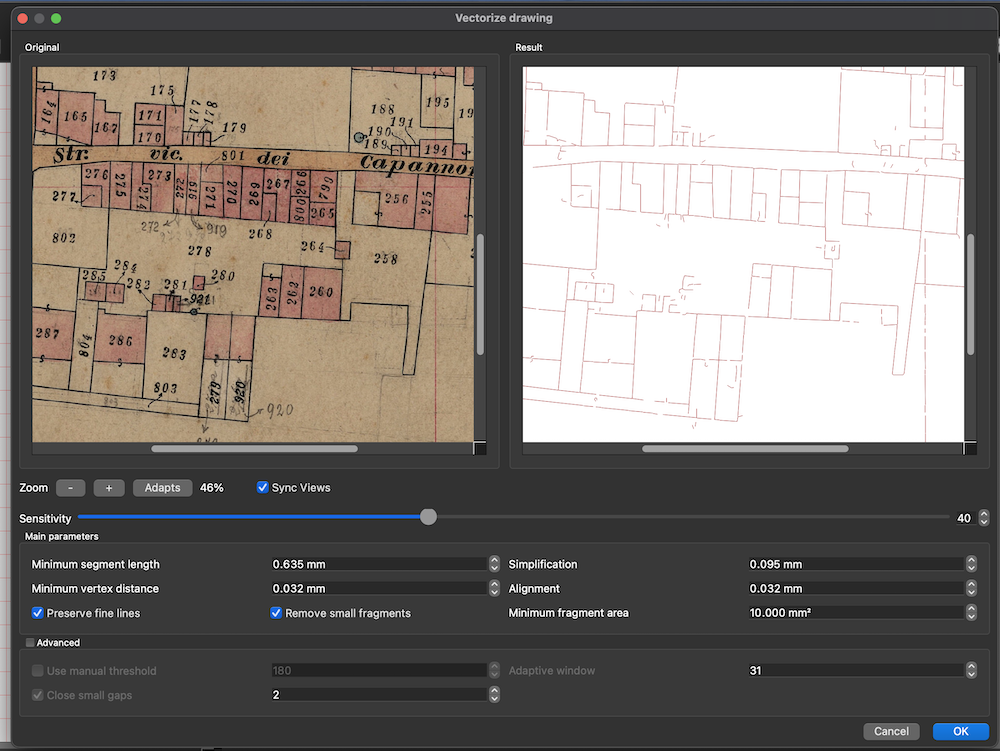
3. adjust the parameters with instant preview;
4. generate the vector polylines;
5. confirm the result and insert it into the current layer.
The window shows the original image and the result side by side, so the user can immediately evaluate the effect of the chosen settings.
Why It Matters
In simple terms, the program does not draw from scratch. It reads the image pixels, interprets their structure, removes what is unnecessary, and reconstructs the main shapes as editable vector objects. This is especially useful for floor plans, technical drawings, maps, and scanned sketches or surveys where a clean, scalable geometry is needed.
Output Quality
The quality of the result depends heavily on the source image. A well-contrasted image with sharp lines and little noise produces much better results. Blurry, compressed, or irregular images usually r
Other information
DigiCad 3D 26 – New functionalities
DigiCad 3D 24 – New functionalities
Digicad 3D 23; The new version
digicad-3d –innovation in photogrammetry and-cartography
Related posts


